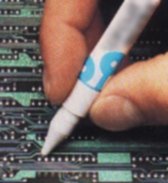
Unlocking Aftermath (2/2)

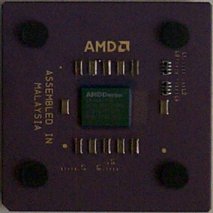
My Duron 650MHz Remember this chip from my previous article? This is a Duron 650MHz. I chose Duron over Thunderbird because of overclockability. The high quality of the AMD chips ensure a fair amount of overclocking already, but Duron's default voltage is 1.5V as opposed to Thunderbird's 1.7V. Since the maximum voltage setting for Socket A is generally 1.85V, Duron has better headroom for overclocking as higher voltage generally helps the chip operating in higher speed provided that a suitable cooling solution is present. Many hardware sites have confirmed that this voltage headroom does indeed help Duron become a good overclocking chip, getting more than 200MHz faster speed in most cases.

Duron's average speed is only about one speed grade (50MHz) lower than Thunderbird and depending on the applications Durons and Thunderbirds perform pretty much the same. Hearing about the overclockability of Duron, I concluded that I had little to lose in performance and a lot to gain from overclocking, saving money in the end. I looked for the local availability of Duron and 650MHz was the only choice. I bought it, only to discover its locked state. That didn't matter for too long, as I was able to unlock it anyway. Now I just needed to see how far the chip would go...
CPU: AMD Duron 650MHz
M/B: Asus A7V (KT-133 Chipset)
Cooling: Alpha PAL6035MUC Fan/Heatsink
RAM: 128MB x 2 Hyundai PC-133 SDRAM
Video: SUMA GeForce2 GTS 32MB
OS: Windows 2000 SP1
Else: Classified ^_^

 
Speed Config Voltage Status
650MHz 100 x 6.5 1.50V Perfect
700MHz 100 x 7.0 1.50V Perfect
735MHz 113 x 6.5 1.50V Good
750MHz 100 x 7.5 1.50V Boot Stop
800MHz 100 x 8.0 1.50V POST Stop
800MHz 100 x 8.0 1.70V Perfect
850MHz 100 x 8.5 1.80V Perfect
1000MHz 100 x 10.0 1.85V No POST
950MHz 100 x 9.5 1.85V POST Stop
900MHz 100 x 9.0 1.85V Good
910MHz 107 x 8.5 1.85V Good
892MHz 105 x 8.5 1.80V Boot Stop
892MHz 105 x 8.5 1.85V Perfect

Perfect = No Crashes Whatsoever
Good = Benchmark Crashes and Freezes Occasionally on Normal Use
Boot Stop = Computer Crashes During Boot or Immediately After Boot
POST Stop = Computer Crashes Before POST finishes
No POST = Cannot Boot At All


As you can notice up there, I had 1 GHz mark in my mind. Unfortunately, my chip wasn't able to break that. 900MHz was not as stable as I wanted either. But at 892MHz, with the maximum voltage possible, it was as stable as the initial 650MHz speed due to good cooling provided by Alpha fan/heatsink combo. After further analysis, speed of up to 935MHz would have been possible with 1.90V setting. But 1.85V of 892MHz setting is scary enough anyways, so I decided not to hack the voltage controls. Now for some benchmarks.
Benchmark 650MHz 892MHz Change
d.net
client
RC5 Long, core#6
(MKeys/s)
2.230 3.083 +38.3%
Sandra
2000
7.6.49
Dhrystone (MIPS) 1855 2545 +37.2%
Whetstone (MFLOPS) 876 1241 +41.7%
MMX (it/s) 2150 2960 +37.7%
3DNow! (it/s) 2751 3781 +37.4%
Memory ALU
(MB/s)
423 442 +4.5%
Memory FPU
(MB/s)
531 553 +4.1%

As expected, synthetic benchmarks reflect the exact increases in clock speed as well as the FSB. Mathematical increase of clock speed from 650MHz to 892.5MHz is 37.3% and most of the results mirror this within margin of error. As for the memory categories, speed increase of 5% in memory from increasing FSB was mirrored in the results as well.

If you're into RC5 code cracking with distributed.net client like me(or my team), you can see that you'll get a very efficient cracking machine (over 3 million keys cracked in a second!) without big investment when you buy a Duron system. :-)
Benchmark 650MHz 892MHz Change
3DMark 2000 Overall
(1024x768 16bit)
3975 4665 +17.4%
Quake3
Arena
v1.11
(fps)
640x480 HQ 98.5 116.2 +18.0%
800x600 HQ 96.1 110.7 +15.2%
1024x768 HQ 83.0 86.3 +4.0%
1280x1024 HQ 50.0 50.2 +0.4%
1600x1200 HQ 33.4 33.4 0.0%

Overclocking to 892MHz also brought up the scores and frame rates nicely. The memory bandwidth becomes a big problem for resolutions equal to or higher than 1024x768, so high resolutions don't benefit much from CPU overclocking, but it does help a lot in lower resolutions.

If you've run 3DMark 2000 on your own a lot, you'll notice that the score is quite low for a 900~MHz CPU with GeForce2 GTS. I think this is generally because 3DMark runs slower in Windows 2000 than in Windows 98, but examining details revealed that something else may be holding back the score. Nevertheless, it did effectively show how the overclocking helped increase the score.

What a difference a pencil makes. :-) By unlocking the CPU that was destined to run only at around 650MHz, I could get a noteworthy performance increase out of it at virtually no cost. A lot of heat was generated while operating at 892MHz, but Alpha PAL6035 was good enough to lower the temperature to acceptable level. You should also note Duron's high overclockability - rock-stable while running at more than 37% the original speed. While it fell a little short of the magical 50% overclock achieved by the legenday Celeron 300A or more recently, Celeron 566, I do not doubt that it would certainly compete well in the overclocked performance arena with its Intel counterpart, 'Celemine(FC-PGA Celeron)'. Now I need to get some sleep...
Unlocking Aftermath (1/2)


After posting the initial unlocking article involving pencil, many positive responses came although I had wondered if the results were reproduced in a favourable manner. It seems that this is indeed the case; a good example is this posting from HardOCP on August 3rd in their Fifth Edition posts.
 

This is what Hard|OCPer Patrick has to say about the Unlocking the Socket A CPUs with a Pencil.

Just wanted to let you know, that you can unlock the TBird w/ a normal #2 pencil by just going over the L1 bridges a few times. I got mine in yesterday, and it worked perfectly. Just thought I would let ya know it worked...


Then just when you thought you have heard the last of it. (which I seriously doubt) Another Hard|OCPer busts out with incredible close-ups of his mechanical pencil microsurgery.  Don't you need a license for that??


all i used was a .7mm mechanical pencil. thanks pin0yclocker


Some new questions popped up. Most of them seem to be generally questioning the safety of the method further. Here are the Q&As that may help you.

Q: Doesn't the pencil markings gradually fall off and become a trouble?

[A]: This is not likely. Mr. Nam of South Korea noted in the guest book entry #134 that even with his heatsink-fan that has serious vibrating conditions, the markings are holding on well. Also, even in the rare chance of the markings falling off to the point that it becomes ineffective to connect the bridge while the computer is on, the normal CPU operation will not be affected (the system won't freeze) since the multiplier setting is detected only at the boot time and is not used while in normal use.

Q: I still don't like the possibility of this 'falling-off'. What are the ways to prevent this effectively?

[A]: You should try to put on a thin layer of cover on top of the markings. Nail polish seems to be a good choice, since applying it, as well as clearing it off is easy. Lacquer is another possibility, though it would be more permanent than nail polish. Neither of the suggestions have not been reported to have been actually tested, so try it at your own risk. Tapes, like scotch tapes may not be good since the chip gets hot and the adhesive may become messy or lose its stickiness.

Q: How about the markings getting mixed up with the heatsink compound?

[A]: The heatsink compounds are not supposed to be on the markings in the first place. Socket A processors are of FC-PGA type, meaning that the core sticks out of its ceramic casing. Thus the heatsink compound is supposed to be on the core area only and never anywhere else. But if the heatsink compound does ever touch them, nothing should happen unless the compound is conductive(which isn't a good choice).

What's the whole point of unlocking a chip? Overclocking, of course! It's clear that a person reading this article is expecting to overclock his/her Socket A chip (Duron and Thunderbird Athlon all apply) or at least looking at the possibility of doing it. This is what happened in my quest of overclocking.

Unlocking Socket A CPUs (2/2)


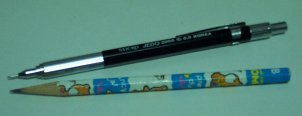
Mechanical Pencil and a Normal Pencil

Reaction to such idea resulted in the reaction in the form of 'you've got to be kidding!' by many, as I posted the topic in AMDZone's discussion forum. It is true. That simple pencil that may be rolling around in your desk is the key to the lock of the Socket A CPU's multiplier.

The preferred pencil lead is of the normal graphite type, and the hardness of HB. So you can say that it's the average type of pencil found in the stationary store. Too hard a lead, it may do damage to the bridge. Too soft a lead, it may get dull too fast and become unsuitable for our precision job. Sharpen your pencil with a pencil sharpener carefully, and make the tip slightly duller than the sharpest by scribbling it on a piece of paper a bit.

Personally, I prefer using a mechanical pencil ('sharp pencil', as it is known where I live) to a normal pencil. This is because the thickness of the lead is very slim so you won't have to worry about becoming it too dull for our use. Use HB hardness lead on a 0.5mm type mechanical pencil. This should also be a standard thickness for a mechanical pencil, so you won't need to worry about this too much.

Unlocking in progress

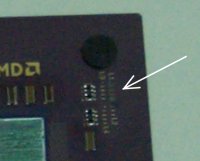
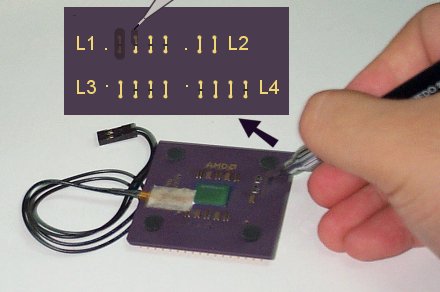
The bridges that we need to connect are the L1 bridges on the top right corner of the Socket A CPU. The picture you see above is my Duron 650 getting unlocked with my trustworthy mechanical pencil. The wires attached to the left of the core is the thermistor that is included with Asus A7V, so never mind that. Now let's get on with the unlocking!

You need to see the tiny L1 bridges clearly, so hold your CPU close to your eyes with one hand and hold your pencil with the other hand. While holding your CPU firmly, rub the lead of the pencil back and forth, on top of the bridge. Make sure the lead goes over only one bridge at a time, or we'll short-circuit it with the bridge next to it. Rub your pencil until the lead deposit is fully covering the bridge. It takes about 20~30 seconds to do this. Repeat this on all four L1 bridges. After you're done, it should look like this.
The unlocked Duron As you see in the picture, the lead should be covering the bridges completely, so the colour of the bridge should be very dark, instead of the usual gold tone. If held sideways, the lead covering should be able to reflect light. Now you've got an unlocked processor. Put it back to Socket A, install the heatsink, and set your motherboard so that manual multiplier selection works. For Asus A7V, refer to my A7V settings page. Boot your computer to see if it worked. If it did, good for you! If it did not, carefully try again.

In a nutshell, there shouldn't be any difference in using pencil in place of conductive pen for unlocking a Socket A processor. Although graphite's conductivity may not be so great as the conductive compound in conductive pen, it does the job just as well since it's used over a very small distance, and since some current just needs to flow through the L1 bridge. Some of you might remember doing conductivity experiment with pencil lead in school or a workshop.

One person suggested that making a current flow through a pencil lead may lead to producing smoke, so it may not be safe. I do remember making a pencil lead burn to crisp, and producing smoke in the process, in a school experiment, but this was done with high voltage and current. The electricity traveling through the L1 bridge is never close to that. I've been running my Duron for days with the system on power 24 hours a day (I coordinate my own RC5 cracking team... ^_^) and I didn't see any smoke during the initial operation nor see my bridges in deteriorated form when I took off the chip to take photos for this article. In other words, the unlocking procedures does not seem to exhibit any problems, whether it be short-term or long-term, if done properly. Of course, I can't take responsibility if your CPU gets damaged by doing this, but even if it didn't work, I would doubt that it would cause any permanent damage to your system's components.

Unlocking Socket A CPUs (1/2)


Changing multiplier is the most effective way to overclock a CPU. However, this can be abused by 'remarkers', who are some disrespectful resellers that remarks the speed printed on the CPU to a higher speed. This way, they can sell the CPU more expensively, as higher speed grade chips are sold with higher premiums. The victims to this scheme are the consumers, who did not actually get the CPU he/she intended to buy, as well as the CPU manufacturer, who cannot receive the profit that they're supposed to receive and have their reputation tarnished since a remarked CPU is running at overclocked setting without knowledge of the customer and thus less stable.

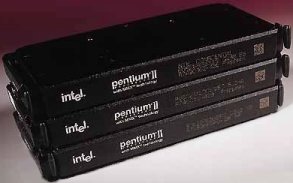
Seeing this as a problem, Intel decided to start locking CPU multiplier permanently on their line of products since Slot1 interface was introduced. So current Intel products can only be overclocked by FSB speed manipulation. AMD, on the other hand, did not take such steps when producing K6-x line of products, although they provided somewhat less overclockability than Intel counterparts.
Intel Pentium II Processor - the first Slot 1 CPU Times have changed, and AMD could not ignore the remarking problem so easily anymore. Predicting the success of their first true performance processor, Athlon, AMD decided to put the multiplier lock also. But it was different from Intel that, although the lock existed on the outside, there were ways to change the multiplier settings inside the cartridge. Upon removing the plastic cartridge, one can plug a 'GFD(Golden Finger Device)' onto a 'golden finger' contacts at the edge of the PCB or move around certain SMD resistors to change the multiplier setting. This has been welcomed by the overclockers' community, but a few very clever remarkers could still abuse this backdoor for their profit.
Now AMD is moving back to the socket type processor with the introduction of 'Thunderbird' Athlon and Duron. Unlike the first-generation Athlons, which came in cartridges and fit into Slot A, these Socket A processors cannot contain neither a 'golden finger' nor SMD resistor for multiplier manipulation since there can only be CPU core, connection pins, and ceramic encasings. It seemed first that it may either be unlocked like the previous socket processors or be locked like the current Intel processors. Now that the actual product has come out and went through scrutinizing eyes of many hardware sites, it has been discovered that the Socket A does not exactly fall into either of the categories. My Locked Duron 650MHz

On the Socket A processors, several 'golden bridges' or set of tiny wires less than a millimeter wide are present with identification such as L3 as you can see in the picture above, at the right and the bottom of the core. The multiplier and the voltage of the chip was determined by how these bridges were cut off by laser in the manufacturing process. This is very good for AMD two-fold; one, they can set the speed they desire after all the assembly and tests are done very easily, meaning less chips are wasted. Two, it will be visually evident if a remarker was to attempt remarking, thus keeping remarking rate to a very low level. Why? The bridges exposed on the surface of the chip, so it is easy to notice, and since they are so small it is hard to cut and connect them without looking tampered.
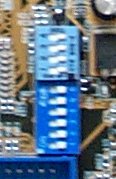
Asus A7V's FSB and Multiplier Jumpers The laser-set multiplier settings were discovered to be adjustable by the motherboard; certain pins from the processor could be controlled so that the multiplier can be set at the user's desire. In case of some motherboards, notably Asus A7V, dipswitches were provided to produce such effect, becoming a choice motherboard for overclockers. Other 'normal' motherboards can still be modified by the user to add a multiplier adjustment support.
Then came the bad news: unlike the processors reviewed by many hardware sites, AMD decided to lock the multiplier setting on retail version of the Socket A CPU in such a way that motherboard dipswitches or modification could not actually change the multiplier. This has been confirmed, and although regional availability may vary, there are now locked Socket A CPUs in circulation.

Of course, the overclockers' community certainly wasn't impressed and compared the locked version to unlocked version to see what was done. It was found that all the 'L1' bridges were cut off by laser on the locked chip, meaning that L1 bridges were the paths to which a motherboard could modify a processor's multiplier. Reconnecting them will revert the locked processor back to the original unlocked state. But how is one supposed to do this?
Hardware sites generally suggested using a conductive pen to connect the bridges. Unfortunately, there are many disadvantages to this. One, it is a bit too expensive just for doing this relatively small job. It costs around $15 (perhaps $20 after shipping) just to get a hold of one of these, and you'll not be using about 95% of the content anyway unless you plan some circuitry creation. Two, it isn't so widely available. I've visited the biggest electronic parts shop in town and they didn't know what it was (for your reference, the population of this town is over a million). Three, some pens produce too think a line for connecting the small bridges we are supposed to tackle. So what was the alternative to this? Read on. Conductive Pen in Use

Asus A7V Dipswitch & Jumper Settings

This is a reprint from the old site - the first real article to go online. I'm using this article to test importing of the old stuff over to this new place. 2005-07-06

Asus A7V motherboard is a heaven for tweakers - it offers various control for your system. However, many settings that overclockers love are poorly documented at best. Here are the settings you need to get your CPU soaring high into the overclocking realm.

JEN

1-2 Jumper
2-3 JumperFree

This setting must be set to 'Jumper' mode first to use the settings listed here. Otherwise, set to 'JumperFree' mode and set the jumpers/dipswitches to 'J/F' settings. Doing so will enable you to adjust the voltage and FSB settings in the BIOS, but multiplier setting will not be available.

Voltage Settings

VID4 VID3 VID2 VID1 Volt
0 0 0 0 1.10
0 0 0 1 1.15
0 0 1 0 1.20
0 0 1 1 1.25
0 1 0 0 1.30
0 1 0 1 1.35
0 1 1 0 1.40
0 1 1 1 1.45
1 0 0 0 1.50
1 0 0 1 1.55
1 0 1 0 1.60
1 0 1 1 1.65
1 1 0 0 1.70
1 1 0 1 1.75
1 1 1 0 1.80
1 1 1 1 1.85
* * * * J/F or Default

1 = Short 1-2
0 = Short 2-3
* = Short 3-4


Default voltage setting for Duron is 1.5V and for Thunderbird Athlon, 1.7V. According to AMD's processor technical documentations, changing default voltage by -+0.1V is acceptable.  Exceeding this guideline may have adverse effects to your CPU, although many Durons and Thunderbird Athlons have been reported to be able to run at the maximum voltage listed without much problem when proper cooling is provided.


FSB Settings

Multiplier Settings

1 2 3 4 MHz 1 2 3 4 5 6 Mul
0 0 0 0 111 1 1 0 1 1 1 5.0
0 0 0 1 102 0 1 0 1 1 1 5.5
0 0 1 0 ? 1 0 0 1 1 1 6.0
0 0 1 1 100 0 0 0 1 1 1 6.5
0 1 0 0 109 1 1 1 0 1 1 7.0
0 1 0 1 95 0 1 1 0 1 1 7.5
0 1 1 0 ? 1 0 1 0 1 1 8.0
0 1 1 1 103 0 0 1 0 1 1 8.5
1 0 0 0 110 1 1 0 0 1 1 9.0
1 0 0 1 101 0 1 0 0 1 1 9.5
1 0 1 0 ? 1 0 0 0 1 1 10.0
1 0 1 1 105 0 0 0 0 1 1 10.5
1 1 0 0 107 1 1 1 1 1 1 11.0
1 1 0 1 90 0 1 1 1 1 1 11.5
1 1 1 0 113 1 0 1 1 1 1 12.0
1 1 1 1 100 0 0 1 1 1 1 12.5
1 1 1 1 J/F 0 0 0 0 0 0 J/F

1 = Switch ON
0 = Switch OFF


FSB stands for Front Side Bus, and for Athlon/Duron systems, data is 'double pumped', so the effective speed is twice that is listed here (e.g. 105MHz -> 210MHz effective). FSB is related to memory bus speed as well as AGP and PCI bus speed, so increasing this too much may harm your peripherals that cannot tolerate higher-than-specified speed.

Multiplier shows how much times faster the CPU runs in relation to FSB. For example, setting 6.0 multiplier with 110MHz FSB setting will yield 660MHz CPU speed. Multiplier setting manipulation is better way to overclock than FSB because it overclocks CPU only. However, most retail version of Duron/Athlon CPUs come with multiplier locked at manufacturing. Fortunately, it has been found that unlocking it is easy.

Copyright (C) 1996-2026 Woo-Duk Chung (Wesley Woo-Duk Hwang-Chung). All rights reserved.