Use Mac as a Web Server (3/5)

Let's run something useful that uses the APM setup. Since I have phpBB and s9y running on this website, I'll look at those. Sounds pretty obvious, considering the reasons why I'm writing this. :-)

4. phpBB

phpBB is a popular internet message board system usually found in many websites and communities around the globe. In Korea, Zeroboard is often used more, however. Both systems use PHP and MySQL to operate. Actually, phpBB is more flexible in that it can use other database engines such as MS-SQL and Access. In the past I would have installed Zeroboard, but I decided to go against the local norm now. I'll do a bit of comparison between the two in a later article if I'm willing.
Continue reading "Use Mac as a Web Server (3/5)"

Use Mac as a Web Server (2/5)

You know, installing MySQL stumped me a lot in the past. I'm a little better at it now, hopefully. Let's dive in!

3. MySQL

Now we need another pillar to put up - a database engine. MySQL is a popular open-source choice for this and works with most of the solutions needing database functionality. Installation of MySQL completes are triple-module setup commonly referred to as "APM" (Apache-PHP-MySQL) or "AMP". Since it's installed on OS X, the whole server setup is called "MOXAMP" (Mac OS X-Apache-PHP-MySQL). Install on Linux and you have "LAMP". You get the idea. The APM setup is prequisite for a lot of dynamic website configuration: you have a web server (Apache) that accesses various database entries (MySQL) through scripting language (PHP), like a blog post.

Oh, yeah, the installation.
Continue reading "Use Mac as a Web Server (2/5)"

Use Mac as a Web Server (1/5)

This article serves two purposes: to show what steps are needed to have a functioning website running on a Macintosh computer, and to remind myself not to forget how to do this later. Yes, I must be dumb. :-P

Okay, you need:

- A Macintosh computer (mine is a Mac mini)
- Mac OS X 'Panther' 10.3.9 or higher (mine is running 'Tiger' 10.4.1)
- Internet connection (direct, or through a router that you can configure)
Continue reading "Use Mac as a Web Server (1/5)"

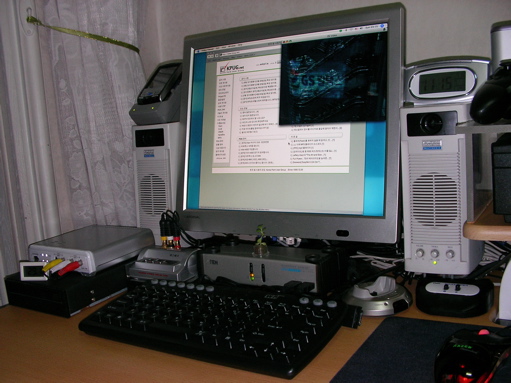
Wesley's computer: 2nd half of 2005


Not much different from the 1st half.

Screen: Cardinal 17-inch LCD
Speakers: Altec Lansing ACS40
Top of the Left Speaker: Samsung MITs-M4300 ('Sasami')
Top of the Right Speaker: KT-Branded Alarm Clock
Left: DV Video Converter, DVR-109 DVD Writer
Under the Screen: Video Selector, Keyboard-Screen-Mouse-Sound-USB Selector, Camera Dock, IEEE1394 Selector
Keyboard: IGK-3000 Mini
Mouse: Razor Diamondback
Continue reading "Wesley's computer: 2nd half of 2005"

Copyright (C) 1996-2026 Woo-Duk Chung (Wesley Woo-Duk Hwang-Chung). All rights reserved.