Entries tagged as battery
A1533 AT&T iPhone 5S A1530 LTE SK Telecom camera slow motion fingerprint sensor Touch ID M7 pedometer 3DMark Cortex Camera Geekbench iPhone 3GS iPhone 4S iPhone 5 Kraken Octane performance SunSpider accelerometer compass gyroscope charger A1524 A1586 iPad iPad mini iPhone 6 iPhone 6 Plus Vega LTE-A A1522 A1549 iPhone 5C belt case OIS Focus Pixels barometer iOS 8 M8 KT LGU+ adapter cellphone JooN 2 power plug USB watch Europe Japan Korea O2E Smart Multi-Charger UK USA Apple Watch cable watchOS 2 iPhone 4 iPhone 6S Plus Bluetooth GPS lightning Micro-USB pen Bitgaram City car electric Naju KPX Celine Chung Hayun Chung shopping KEPCO Bolt EV iPhone X road Chevrolet astronomy ISS Moon satellite iOS sound Han-gang river Seoul passcode Canon SX50 HS flare Iridium Alhena constellation Jupiter Orion Christmas tree decoration balls lights sled snow screwdriver table cookie milk Oreo Homeplus pizza chocolate chip cookies couch FaceTime New Year's Day rice cake Skype Sung-Eun Kim tteokguk computer swing Toys R Us trampoline Mega Kids Box Megabox movie theatre Wesley Woo-Duk Hwang-Chung tortilla wrap toothbrush salad Disney Frozen remote controlled helicopter repair replacement Syma S107G Danish butter cookies animation Larva shopping cart screen Screen Glue screen protector cleaning bus Tayo toy s9y server search Burger King clock desk office melodica Mac mini macOS OS X Sierra headlights lamp Sonata 2 High Sierra iMac bicycle bottle holder MySQL epoxy umbrella laptop iPhone SE SR626SW band tire printer toner glass iPhone 16 Pro HomeKit weather air conditioner filter Canada Hong Kong T-Mobile Verizon Apple Store Fukuoka Fukuoka Airport Incheon International Airport subway travel leather case VoLTE Reachability iPhone 6+ Genmob BEXCO bed Busan exposition house laser pointer porcelains pork cutlet restaurant BMW electric vehicle i7 Boston Dynamics Hyundai robot Inside Out Kia movie skating boat Gwangju Hakata hydrofoil lake park seaport Dazaifu museum temple train udon zoo cathedral flower garden IKEA agriculture BIXPO Daepoong DE101 solar panel wind turbine drone ESS 3D printing chocolate Associated Press Photo Exhibition Kimdaejung Convention Center coronavirus Daejeon National Science tester ball play set playground beverage coffee shop Dubai milkshake COEX leaf straw fire observatory building construction hotel model Choco Pie snack Ozobot programming school Everland rain tree London Heathrow Airport Underground Korean Air Paddington Station toilet airplane strike double decker Vodafone breakfast Big Ben London Eye Nelson's Column Trafalgar Square fish & chips cruise ship HMS Belfast Tower Bridge Tower of London entertainment system Volo TV Irn-Bru Ribena Schweppes Volvic kimchi ramen ramyeon rice supermarket British Museum van Assyria Egypt Greece Persia Oband T2 water resistance Nintendo Wii running swimming Wii Fit Plus barcode remote control iOS 9 Yunmai Smart Scale app iOS 10 watchOS 3 box iPhone 7 Plus Series 2 butadon watchOS 7 Sanyo VPC-C4 Minolta Dimage X20 binoculars Chuseok telescope eclipse Kodak Z1085 IS star Sun electric fan LED light trail M&M's Balance Board game Wii Party Mario Kart HDMI 3D Touch A1687 A1779 earphone iPhone 7 IoT refrigerator Samsung CGV hot dog popcorn Galaxy Fold Galaxy S20 Ultra Galaxy Z Flip pool telephone Vietnamese noodles Canon EOS 450D Kiwi Fotos KF-8012N Sony A5000 Celestron NexStar 6SE dock speaker electricity smart plug socket wire MacBook Air apple Yongsan iOS 13 iPhone 11 Pro memory MicroSD storage LAN Electron Street magnet USB-C Haenam mountain MacBook Pro external case SSD hook & loop credit card pocket Nikon CoolPix P1000 Simpsons: Tapped Out Comic Life Crop-Size image resizer Resize Image Resize Photo SimpleResize China lunar calendar iOS 12 iPad Pro 9.7 iPhone XS satellite TV shower television water card reader mouse LG Electronics microwave store HDD keyboard monitor Xbox cooler Native Union hub PeaceKeeper App Store news newspaper interview 2011 iOS 5.0.1 build 9A405 VoIP A1633 A1634 A1688 iPhone 6S Osaka artificial star collimation LG Prada 3.0 Seojun Electric smart meter Gangneung Starbucks
Summary of Apple Watch reviews
Posted by Wesley on
Apple Watch's Korean launch is just a few days away (June 26) and I'd like to offer you a nicely consolidated list of all my reviews for your convenience. I hope this will help you get some idea on whether you should get one and how you should use it if you do.
| Preview | Summary |
|---|---|
 |
1. One of the first Apple Watch in Korea |
| Sent three days after the official release in the US and arriving about a week later, one of the first Apple Watch to land in Korea gets prompt unboxing and gets ready for a full review. | |
 |
2. Getting the Apple Watch up & running |
| I have the bands installed in place and the battery wirelessly charged up, so that I can pair the Apple Watch with my iPhone 6 Plus and make it work. | |
 |
3. Basic screens & buttons of the Apple Watch |
| Apple Watch's many screens are explored, including the watch face, lock screen, home, and favourites. I also try out the digital crown and the side button. | |
 |
4. Notifications & contacts on Apple Watch |
| As one of the primary functions, I took a look at how the notifications appear and interact. Then I tried contacting someone with Apple Watch, either through text or voice. | |
 |
5. Apple Watch's daily life tracking |
| Fitness tracking with Apple Watch is explored, including the heartbeat measurement with an integrated sensor and the daily activity logging through a three-ring system. | |
 |
6. Running, swimming with Apple Watch |
| I had both Nintendo Wii Fit Plus and Apple Watch record indoor running sessions to see how they compare. Then I went swimming with my Apple Watch to see if it'd actually work. | |
 |
7. Apple Watch as an extension, stand-in |
| I tried using Apple Watch as a replacement for membership cards. Then I remote controlled my Apple TV and iPhone 6 Plus camera with it, as well. | |
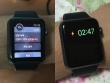 |
8. Battery life of the Apple Watch |
| I recorded my Apple Watch's battery life for three weeks, through international travels and all sorts of exercises, to see if Apple's claims stood up. | |
 |
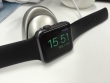
9. More Apple Watch observations |
| I took a look at how fast the Apple Watch charges up and how step counting data are consolidated. Also, I have some more tips and observations on its daily use. | |
 |
10. 45 days with Apple Watch & watchOS 2 |
| Seven weeks later, the hardware of Apple Watch Sport is still standing up quite well. But early watchOS 2 and iOS 9 betas are incredibly rough to use. |
Defined tags for this entry: Apple Watch, barcode, battery, camera, Nintendo Wii, Oband T2, remote control, running, screen, swimming, watch, watchOS 2, water resistance
More Apple Watch observations
Posted by Wesley on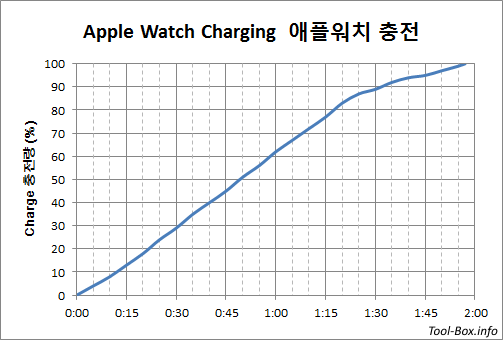
Apple Watch charging curve
1. Charging Speed
I knew that my Apple Watch gets charged in about two hours, but I couldn't do charging test because it's rare to see it drained to 0% on normal use and I was collecting battery use data for the first three weeks. Now that this was done, I induced the watch to drain until it went into Power Reserve mode as it hit below 1%. Then I put it on the charger to see how it went back to 100%. During the time, no notifications were received by the watch and the only time the screen was on was when I checked the charging status every 5 minutes.
Apple's official document claims that a (38mm) Apple Watch would charge up to 80% in 1.5 hours, and take another hour to hit 100%. In testing my 42mm watch, it charged to 82% in 1 hour 20 minutes, getting about 5 to 6% charged every 5 minutes. 37 minutes later it became fully charged, taking slightly less than two hours (1 hour 57 minutes) total. Perhaps Apple's estimates were conservative.
Seeing as I generally have 20 to 30% of battery left when I charge it daily, this means I can put my watch back on after about an hour and a half of charging. Less downtime is good.
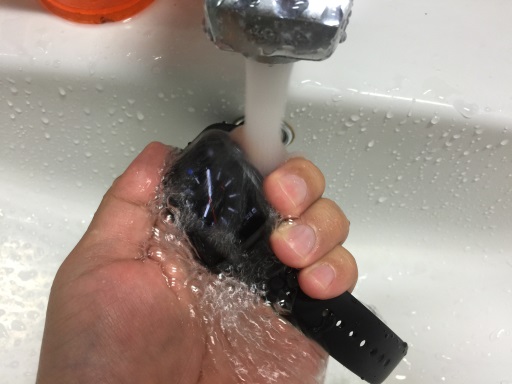
Washing Apple Watch in water
2. Water, Cleaning, & Touch Screen
In the first two weeks of use, I didn't let my Apple Watch touch flowing water. I simply wiped off any dirt or sweat with a cloth. Interestingly, the digital crown began to feel sticky. It used to be that it would effortlessly spin when touched with a finger, but this was not the case anymore.
Seeing that the device was water resistant, I thought it would make sense to clean it with water to resolve the situation. And indeed, after a light dip in the running tap water, the stickiness was gone. To prevent any future occurrences and for good hygiene, I have the watch washed at least once daily these days.
As I wash the watch, the flow of water onto the touch screen usually turns the screen off. But occasionally the screen gets turned back on and certain flows of water get interpreted as finger touches, resulting in unintended button pushes or swipes. This seems to be the culprit of a minor annoyance when swimming with the Apple Watch. Midway through a swimming session, it sometimes decides to stop logging, and an errant press on the (X) button on the screen might have happened.
Battery life of the Apple Watch
Posted by Wesley on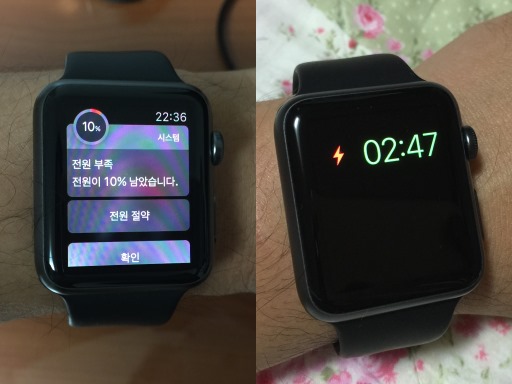
Apple Watch gives warning at 10% (left) and enters Power Reserve near 0% (right)
With some of the smart watches or bands lasting a few days to a week, Apple Watch's claim of an 18-hour use for a typical day in case of the 38mm version was viewed as being too short and even the worries about the device not lasting a full day came about. Apple did claim that the 42mm version had a larger battery and would last somewhat longer. With all these in mind, I decided to log the daily battery status of my 42mm Apple Watch Sport for the past three weeks.
So how was it? First of all, Apple Watch doesn't say anything outright about its battery status unless it drops to 10%, at which it displays the warning you see above. (You could check the exact amount of battery left from one of the Glances whenever you want, by the way.) Personally, it was rare for me to even encounter this message at the end of a normal day, as you'll see later. So that alone tells you that the device is good enough for a full-day use. If you do get to see the warning, you could choose to enter the Power Reserve mode or ignore.
Power Reserve mode shuts down every function except the the time-telling ability like you see above so that it'll function as a watch as long as possible. When the battery does go near 0% (I think it happened around 2% remaining), it'll automatically enter this mode anyway. It's a last ditch effort to maintain its identity until you're able to charge it back to its normal life, so it'll be good if it could be avoided as much as possible.
3-week graph of Apple Watch usage time
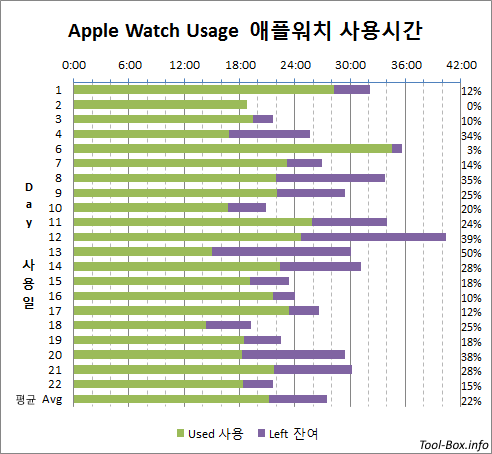
This graph shows the result of the three-week use, which included all sorts of different usage patterns. Some involved heavy testing; some days I was traveling overseas; and some days I wasn't doing much but mostly sit around the office. All these were boiled down to these coloured bars - green bar represents the actual use time for the day, and the violet bar is the estimated time left until the battery runs out based on the remaining battery percentage noted on the far right.
On average, I got 22 hours and 12 minutes of use per day, with 6 hours and 17 minutes of use left, or about 22%. At no time did the combined time dip below 18 hours. These all clearly indicate that the 42mm version can last one full day of use. And if you forgot to recharge before going into sleep, you still have a good chance that it'll at least last the morning until you can get a two-hour charging session then.
What's also clear is that it will not realistically last full two days unless you use it really sparingly, so you need to get used to a daily recharging routine. Personally, I try to recharge about two hours before bedtime and get into sleep with a fully charged watch. I'm fine with this, but for those wanting to minimize the gap as much as possible, it might be disappointing.
Today's "The Toon-Box"
Posted by Wesley on
Defined tags for this entry: battery, BEXCO, Busan, exposition, house, laser pointer, pen, porcelains, travel